引言
最近突然领会了一个导航网站(dashy)的妙用
除了可以放项目地址,编译 发布地址打开对应小程序之外还可以直接ssh连接到测试服务器;更可以改造脚本直达日志文件位置;让每天的班可以上的开开心心
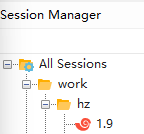
xsh是xshell保存其session的配置文件格式;当本地配置好连接服务器的方式后可以直接从Session Manager中双击名称连接到服务器;
而xshell命令行工具(Xshell Command Line Options)刚好支持使用xsh文件打开,且可以使用相对路径;这免于密码输入的连接方法秒杀ssh://这种协议(详见前文:注册sshurl协议一键打开terminal)
解决方案
注册xsh://这样的协议需要修改注册表;假如只用注册表,使用cmd或者powershell这样的脚本都会有黑屏弹窗的问题
只有vbs可以纯后台不弹窗启动应用;因此需要写两个文件:register-xsh-protocol.reg和xshell-handler.vbs
拆分后方便开发及调试;先给出我的文件:
register-xsh-protocol.reg
Windows Registry Editor Version 5.00
[HKEY_CLASSES_ROOT\xsh]@="URL:Xshell Protocol""URL Protocol"=""
[HKEY_CLASSES_ROOT\xsh\DefaultIcon]@="\"C:\\Program Files (x86)\\NetSarang\\Xshell 8\\Xshell.exe\",0"
[HKEY_CLASSES_ROOT\xsh\shell]
[HKEY_CLASSES_ROOT\xsh\shell\open]
[HKEY_CLASSES_ROOT\xsh\shell\open\command]@="wscript \"D:\\Tools\\xshell-handler.vbs\" %1 "xshell-handler.vbs
' xshell-handler.vbsSet objArgs = WScript.ArgumentsIf objArgs.Count = 0 Then WScript.Quit
' get url xsh://%USERPROFILE%/test.xsh)rawUrl = objArgs(0)
' 1. replace xsh://path = Replace(rawUrl, "xsh://", "")
' remove last /If Right(path, 1) = "/" Then path = Left(path, Len(path) - 1)End If
' 2. decode' path = Unescape(path)path = Replace(path, "%20", " ")path = Replace(path, "%40", "@")path = Replace(path, "%3A", ":")path = Replace(path, "%5C", "\")path = Replace(path, "%22", """")
Set shell = CreateObject("WScript.Shell")
' 3. use enviromentfinalPath = shell.ExpandEnvironmentStrings(path)
' 4. Xshell 的实际程序路径 (请根据你的版本确认路径)xshellExe = """C:\Program Files (x86)\NetSarang\Xshell 8\Xshell.exe"""
' WScript.Echo finalPath
' shell.Run """C:\Program Files (x86)\NetSarang\Xshell 8\Xshell.exe"" \work\hz\1.9.xsh"""shell.Run xshellExe & finalPath补充说明
相对路径打开zsh session用这个URL:xsh://%5Cwork%5Chz%5C1.9等价于xshell \work\hz\1.9
绝对路径使用变量打开zsh session用这个URL:xsh://%22%25USERPROFILE%25%5CDocuments%5CNetSarang%20Computer%5C8%5CXshell%5CSessions%5Cwork%5Chz%5C1.9.xsh%22
等价于cmd的xshell "%USERPROFILE%\Documents\NetSarang Computer\8\Xshell\Sessions\work\hz\1.9.xsh"(这个链接可以用js代码计算得出:encodeURIComponent('"%USERPROFILE%\\Documents\\NetSarang Computer\\8\\Xshell\\Sessions\\work\\hz\\1.9.xsh"'))
-
powershell直接测试xshell的命令为:xshell \work\hz\1.9,完整说明请见官方文档:Xshell Command Line Options -
cmd中直接测试xshell-handler.vbs的命令为:wscript "D:\Tools\xshell-handler.vbs" xsh://%5Cwork%5Chz%5C1.9" -
vbs中显示变量值用WScript.Echo finalPath -
url中有部分关键字不能使用,因此需要转义(比如\符号就要用%5C) -
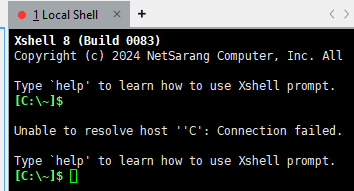
url通常以/结尾会导致传递给xshell的路径异常:Unable to resolve host ''C': Connection failed因此需要手动移除末尾/