
277 字
1 分钟
devexpress如何隐藏PropertyGridControl中的行
引言
PropertyGridControl实际是Vertical Grid,它的每一行对应的是PropertyGridControl.SelectedObject中的属性,如果我想根据值隐藏行应该怎么做呢?
解决方案
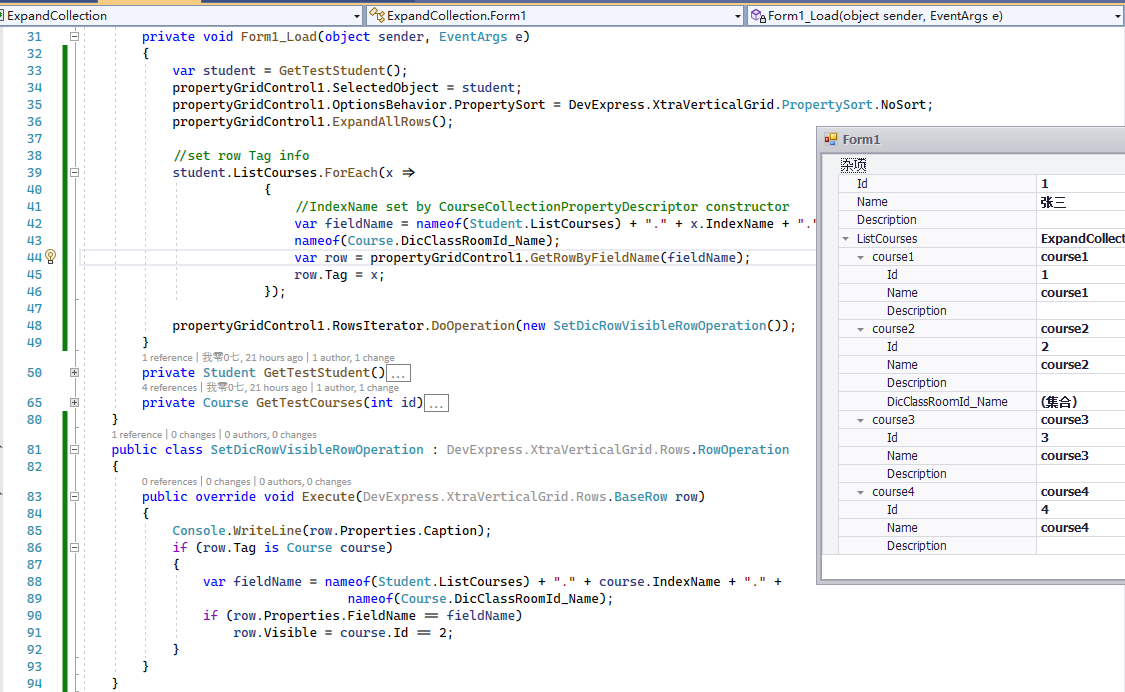
假如我现在只需要显示Course.Id=2的DicClassRoomId_Name栏位,查看Tree Traversal可知,可以通过VGridRowsIterator.DoOperation 方法遍历整个树达到自定义行内容的功能。
为此需要实现一个RowOperation (完整代码在文末)
public class SetDicRowVisibleRowOperation : DevExpress.XtraVerticalGrid.Rows.RowOperation{ public override void Execute(DevExpress.XtraVerticalGrid.Rows.BaseRow row) { Console.WriteLine(row.Properties.Caption); if (row.Tag is Course course) { var fieldName = nameof(Student.ListCourses) + "." + course.IndexName + "." + nameof(Course.DicClassRoomId_Name); if (row.Properties.FieldName == fieldName) row.Visible = course.Id == 2; } }}在遍历之前,还需为Row保存相关信息
private void Form1_Load(object sender, EventArgs e){ var student = GetTestStudent(); propertyGridControl1.SelectedObject = student; propertyGridControl1.OptionsBehavior.PropertySort = DevExpress.XtraVerticalGrid.PropertySort.NoSort; propertyGridControl1.ExpandAllRows();
//set row Tag info student.ListCourses.ForEach(x => { //IndexName set by CourseCollectionPropertyDescriptor constructor var fieldName = nameof(Student.ListCourses) + "." + x.IndexName + "." + nameof(Course.DicClassRoomId_Name); var row = propertyGridControl1.GetRowByFieldName(fieldName); row.Tag = x; });
propertyGridControl1.RowsIterator.DoOperation(new SetDicRowVisibleRowOperation());}由于上一篇文章devexpress如何在PropertyGridControl中直接编辑集合成员的影响,FieldName发生了变化,此处根据PropertyDescriptor的逻辑生成了FieldName。
参考资料
devexpress如何隐藏PropertyGridControl中的行
https://blog.wangshuai.app/2021-09-27-devexpress如何隐藏propertygridcontrol中的行/