
574 字
3 分钟
王者荣耀世界优化着色器报错解决办法
引言
最近启动《王者荣耀世界》时,在优化着色器的过程中遇到了游戏崩溃。
报错内容如下:
Fatal error: [File:Unknown] [Line: 934]Rendering thread exception:Fatal error: [File:Unknown] [Line: 1182]ShaderCodeArchive::DecompressShader(): Could not decompress shader (GetShaderCompressionFormat=Oodle). The CPU (13th Gen Intel(R) Core(TM) i7-13700K) may be unstable; for details see http://www.radgametools.com/oodleintel.htm
0x00007ffba9a21c0a KERNELBASE.dll!UnknownFunction []0x00000001468640f1 NGR-Win64-Shipping.exe!UnknownFunction []0x0000000146866e9c NGR-Win64-Shipping.exe!UnknownFunction []0x0000000141a11581 NGR-Win64-Shipping.exe!UnknownFunction []0x000000014682dff2 NGR-Win64-Shipping.exe!UnknownFunction []0x0000000144166640 NGR-Win64-Shipping.exe!UnknownFunction []0x0000000142a4de40 NGR-Win64-Shipping.exe!UnknownFunction []0x00000001446e23d5 NGR-Win64-Shipping.exe!UnknownFunction []0x0000000141067b8e NGR-Win64-Shipping.exe!UnknownFunction []0x0000000141065f95 NGR-Win64-Shipping.exe!UnknownFunction []0x0000000141379b11 NGR-Win64-Shipping.exe!UnknownFunction []0x0000000141379cb0 NGR-Win64-Shipping.exe!UnknownFunction []0x0000000141067d6d NGR-Win64-Shipping.exe!UnknownFunction []0x000000014106a43f NGR-Win64-Shipping.exe!UnknownFunction []0x000000014106a1b5 NGR-Win64-Shipping.exe!UnknownFunction []0x0000000142a4841f NGR-Win64-Shipping.exe!UnknownFunction []0x00000001417e091d NGR-Win64-Shipping.exe!UnknownFunction []0x00000001417e02b2 NGR-Win64-Shipping.exe!UnknownFunction []0x00000001417e01ca NGR-Win64-Shipping.exe!UnknownFunction []0x000000014145c024 NGR-Win64-Shipping.exe!UnknownFunction []0x000000014145beda NGR-Win64-Shipping.exe!UnknownFunction []0x00007ffbab75e957 KERNEL32.DLL!UnknownFunction []0x00007ffbac7ead6c ntdll.dll!UnknownFunction []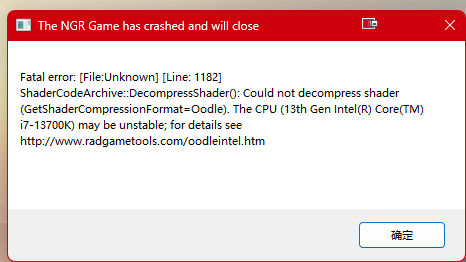
这问题从6月二十多号的着色器优化出现;等它两周了还没解决;不知道这些人怎么搞的
问题原因
这个问题主要出现在使用13、14代Intel CPU中,因为众所周知原因;这两代CPU 缩肛了,报错弹窗中也会提示CPU可能不稳定。理论上可以通过给CPU降频解决。
我之前玩SC2时也遇到过13、14代Intel CPU导致的游戏崩溃,最后通过降频解决
解决方案
解决方法就是在游戏启动器的设置中清理着色器缓存,然后重新启动游戏,让游戏重新生成着色器缓存。
这个解决方案不行,多试几次后依旧会报错;最终还是通过降低电压成功进游戏的:
我是Micro-Star PRO Z690-A WIFI DDR4主板,在性能中做如下设置:
-
关闭
Intel SpeedStep和Intel Speed Shift -
设置
p-core ratio从+1到-2
清理前备份
着色器缓存文件位于游戏目录:
C:\Program Files\KingLauncher\HOKWorld\WindowsNoEditor\NGR\PSOCache清理前可以将整个PSOCache文件夹复制到其它位置备份。如果清理后出现其它问题,可以再将备份文件恢复到原目录。
操作步骤
-
打开《王者荣耀世界》启动器,进入
设置 -
在左侧选择
更新修复 -
找到
着色器缓存,点击一键清理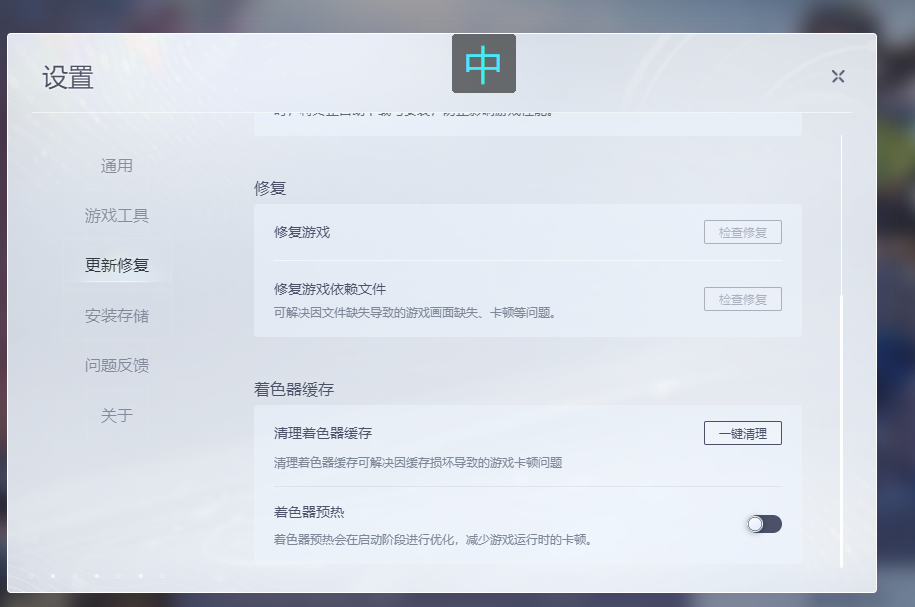
-
清理完成后重新启动游戏,等待游戏再次优化着色器
注意事项
清理后着色器优化还是有可能失败,但成功率会大大提高;我试了三次就成功了。
王者荣耀世界优化着色器报错解决办法
https://blog.wangshuai.app/2026-07-11-王者荣耀世界优化着色器报错解决办法/